
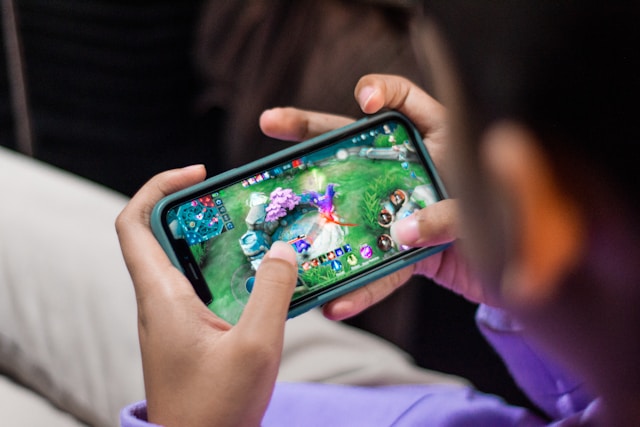
What Is Mobile Game UI?
Mobile game UI (user interface) is the bridge between player intention and in-game action. It’s the collection of menus, buttons, icons, health bars, pop-ups, and transitions that let players interact without friction. But in mobile gaming, UI isn’t just visual — it’s tactile. Every animation and vibration needs to communicate clarity and reward.
Think of it as the game’s personality. A puzzle game with minimal UI feels calm and deliberate; an RPG with glowing menus feels adventurous. The interface must match the tone of the world it represents.
Core Principles of Mobile Game UI Design
Designers often follow unspoken rules to make their interfaces both beautiful and functional. Here’s a breakdown of what matters most:
| Principle | Description | Practical Impact |
|---|---|---|
| Clarity | Players must instantly understand what each icon or element does. | Improves usability and retention. |
| Consistency | Design patterns repeat across menus and gameplay. | Reduces learning curve and confusion. |
| Feedback | Visual or haptic responses to user actions. | Enhances engagement and satisfaction. |
| Hierarchy | Key information stands out through size, contrast, or placement. | Improves focus and decision-making. |
| Adaptability | Scales seamlessly across devices and resolutions. | Ensures a consistent experience for all players. |
Common UI Elements in Mobile Games
Every genre has its own UI flavor, but certain components appear across nearly all games. Knowing these core elements helps designers plan layouts more effectively:
| UI Element | Purpose | Design Tip | Example Use |
|---|---|---|---|
| HUD (Heads-Up Display) | Shows real-time data like health, score, or ammo. | Keep it small, clear, and out of the main action zone. | Battle royale and racing games |
| Navigation Menus | Help players move between levels, shops, or settings. | Use icons + labels for clarity. | RPGs and adventure games |
| Pop-Ups | Display rewards, upgrades, or achievements. | Include tactile feedback and quick close options. | Casual and idle games |
| Onboarding Screens | Introduce players to core mechanics. | Keep them short, interactive, and skippable. | All genres |
| Call-to-Action Buttons | Encourage key interactions like “Play,” “Upgrade,” or “Retry.” | Use bright color contrast and clean typography. | Every game |
The Psychology Behind Great UI
A strong mobile game UI doesn’t overwhelm—it guides. The best designers think like players, predicting frustration points and building joy through interaction. Every sound, bounce, and glow reinforces one idea: “You did something right.”
This is where UX (user experience) merges with UI. The two aren’t separate; they’re partners. You can’t have visual beauty without usability, and you can’t have usability without emotional rhythm.
Color and Visual Hierarchy
Color does more than decorate—it instructs. Red warns. Green affirms. Blue calms. Consistent color coding helps users navigate subconsciously. And hierarchy (deciding what deserves visual priority) ensures players focus on what matters most—goals, not clutter.
Animation: The Soul of Interaction
Subtle motion gives feedback without words. A button that slightly expands when tapped, a card that flips to show a reward—these gestures make digital touch feel human. Too much animation, though, and you risk distraction. The golden rule? Animate intention, not decoration.
Case Studies: UI Lessons from Top Games
- Clash Royale: Uses bold, chunky shapes and motion feedback that make interactions feel physical.
- Among Us: Simple, readable layout that supports social gameplay and quick actions.
- Genshin Impact (Mobile): Complex UI made intuitive through consistent spacing and layered hierarchy.
- Candy Crush: Color-coded logic and tactile motion drive dopamine through pattern recognition.
Design Challenges
Designing for small screens means balancing clarity and aesthetics. Every pixel counts. Overdesigning leads to clutter, while underdesigning risks confusion. The key? Iterate fast, test often. Player feedback is the ultimate UI validator.
Accessibility and Inclusivity
Modern mobile games must account for diverse players—those with color blindness, motion sensitivity, or limited mobility. UI that adjusts font size, contrast, and gesture intensity ensures no one is left behind. Accessibility isn’t a bonus—it’s good design.
Tools for Mobile Game UI Design
- Prototyping & Wireframing: Figma, Adobe XD, Sketch
- Animation & Interaction: After Effects, Lottie, Principle
- Game Engines: Unity, Unreal Engine, Godot
- Testing: UserTesting, Maze, PlaytestCloud
Trends in Modern Mobile Game UI
- Minimalism: Simplified visual language for better clarity.
- Dynamic Feedback: Haptic and sound integration for immersion.
- Adaptive Layouts: Interfaces that adjust to aspect ratios and gestures.
- Gamified Menus: UI that feels like part of gameplay, not separate from it.
Conclusion: The Unseen Hero of Player Experience
When players lose themselves in a mobile game, it’s not just the art or story doing the work—it’s the interface quietly enabling flow. A great mobile game UI feels like second nature, an extension of the player’s intent. It’s not about making buttons pretty; it’s about making them invisible through function.
Author’s Note (E-E-A-T Transparency): Written by a professional UI/UX designer with experience in mobile gaming and interactive design. Insights are based on real production workflows, playtesting sessions, and collaborations with development teams across genres.